


UCPlaces | Guided Audio Tours
3.511.00 Reviews
App Specs
- Version
- v2.9.4
- Updated On
- License
- Free
- Downloads
- 500,000+
- Developer
- UCPlaces LLC
- Categories
- Travel & Local
- Platform
- Android
Screenshots

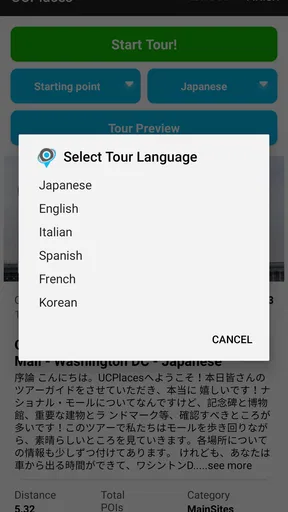

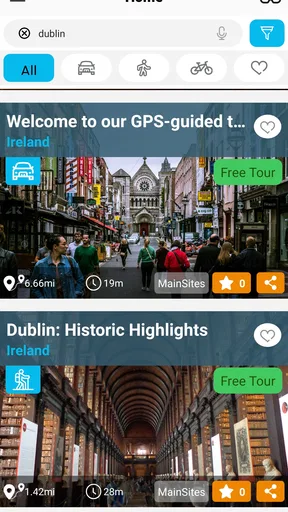
 Analysis by AppCompare
When I plan a day somewhere unfamiliar, I like having enough direction to get moving without turning the outing into a checklist. That balance is what makes UCPlaces appealing: it pairs narrated tours with navigation, giving me a way to explore at my own pace while still having a route to follow. It is a travel and local discovery app from UCPlaces LLC, and I see it as a practical middle ground between wandering entirely on instinct and joining a scheduled group tour.
A good fit for a flexible day out
The strongest use case is a visit where I have time to walk, but do not want to spend every few minutes searching for what to see next. A self-guided tour can give a neighborhood some shape: I can follow its route, listen for context, and still stop when a shop, view, or side street catches my eye. That flexibility is useful for solo travelers, couples, and small groups who would rather set their own pace than keep up with a guide.
It also suits a familiar place seen with fresh eyes. On a free afternoon in my own city, I might pick a history-focused route and let the narration supply a reason to look more closely at buildings I normally pass without noticing. The value is not only reaching a landmark; it is having a thread of stories that connects one stop to the next.
Plan the route before setting off
I would choose a tour while I have a moment to browse, rather than standing on a busy pavement trying to make a decision. Think about how much time and energy you actually have, and whether you want a focused walk or a more leisurely outing. A route that sounds fascinating can still be a poor match if you are tired, traveling with someone who needs frequent breaks, or trying to fit several other plans into the same afternoon.
Downloading a tour ahead of time is a particularly useful habit when you expect patchy reception. It can also help keep the outing simpler: decide on the tour before leaving, get it ready, and avoid relying on a strong mobile connection once you are moving around. I would still begin with a charged phone and a quick look at the route, because audio and navigation are most helpful when the device is ready and easy to consult.
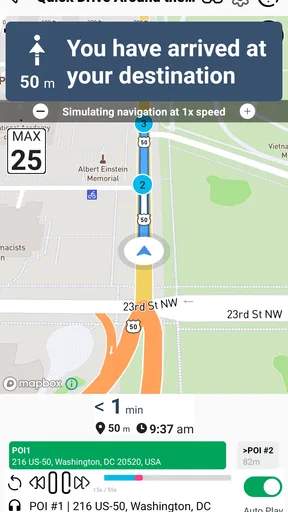
There is a small but important trade-off in following GPS directions while sightseeing: the phone is a guide, not a substitute for paying attention to the street. I would check the next direction when stopped somewhere safe, then put the screen away and enjoy the surroundings. That is especially sensible at crossings, in crowded areas, or anywhere where looking down could make the walk less comfortable.
Getting Started with UCPlaces
First things first, downloading UCPlaces is a breeze. Available on both Android and iOS, it’s just a quick tap away. Once you’ve got it up and running, you’re greeted with a clean and intuitive interface. It’s like the app is saying, “Hey, let’s explore!”
Worth Reading Before You Choose

Flipboard Shows What News Apps Must Do Beyond the Feed

Switching to Android Auto Means Rethinking Your Driving Routine

Google Calendar Makes a Crowded Week Easier to Manage

Ludo King Makes the Most of the Minutes Between Plans

Baby Panda World Brings Quick Play to Modern Phones, but Its Game Library Feels Busy

ESPN’s Live Game View Makes Following Close Games Easier
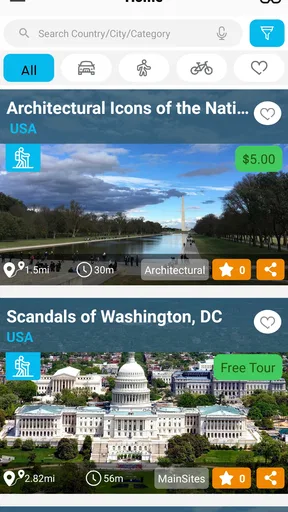
The app offers a variety of tours, ranging from historic walks to culinary adventures, so there’s something for everyone. What’s neat is that each tour is crafted by local experts, giving you an authentic experience. You can browse through categories or search for specific interests, making it super easy to find a tour that piques your curiosity.
The Experience
Now, onto the actual tours. I decided to try out a historical tour in my area. As soon as I hit play, I was greeted by a friendly voice, guiding me through the city’s hidden gems. The audio quality was top-notch, and the narration was engaging without being overwhelming. It felt like I had a knowledgeable local whispering secrets in my ear.
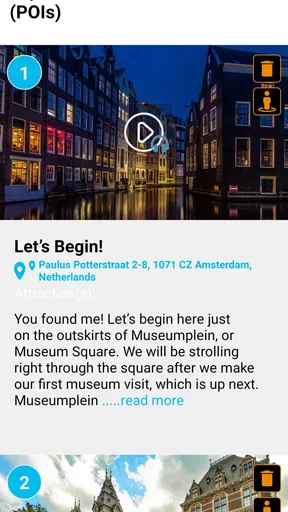
The app uses your GPS location to provide a seamless experience, giving you directions and fascinating tidbits of information as you move from one point to the next. I didn’t have to constantly check my phone, which meant I could truly immerse myself in my surroundings.
Features that Shine
What sets UCPlaces apart is the personalization it offers. You can customize the pace of your tour, so whether you’re a fast walker or someone who likes to take their sweet time, the app has you covered. Plus, you can pause and resume tours as you like, which is perfect if you stumble upon an interesting café and decide to take a break.
Another standout feature is the offline mode. Before heading out, you can download the tour, which means no worries about losing signal or racking up data charges. It’s these thoughtful touches that really enhance the overall experience.
Make pauses part of the plan
Pause and resume are more than convenience buttons when the day has its own rhythm. If I reach a café, need to wait for a friend, or want to spend longer at a stop, I can take that break without treating the tour like a race. I find this works best when I make a loose plan with a few natural pauses rather than expecting to walk continuously from beginning to end.
For a group, I would agree on a simple routine before pressing play: one person handles the phone, everyone listens together, and the group stops somewhere safe when it is time to check directions. This avoids the common problem of one person trying to narrate while the rest drift ahead. It also makes the experience feel shared without requiring everyone to keep looking at a screen.
Headphones can make narration easier to hear, but I would choose a setup that still lets me notice traffic and people around me. In a busy city, situational awareness matters more than perfect audio immersion. If I cannot hear the narration comfortably without blocking out the street, I would pause and listen from a quieter spot instead of forcing it while walking.
Settings and choices worth checking
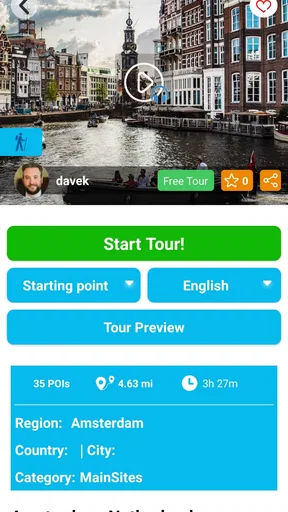
Before starting, I would look at the tour’s description and route details rather than choosing only by its subject. A history theme may sound right, but the practical question is whether the route fits the kind of outing I want today. I would also make sure the selected tour is ready for offline use before leaving, especially if I expect to travel through areas where reception may be unreliable.
There is no need to make every outing an ambitious one. On a day with limited time, I would favor a route that feels manageable and leave room to stop. If I have a full afternoon, I can be more relaxed about detours. That judgment is part of using a self-guided tool well: the app supplies structure, but I decide how much of it suits my energy, companions, and schedule.
Offline preparation helps with connectivity, but it does not remove the need to manage a phone during a long walk. I would start with a charged device and avoid repeatedly opening the screen just to reassure myself that the route is still there. The combination of preparation, audio, and occasional safe checks is more comfortable than navigating by staring at the map every few steps.
How it compares with familiar alternatives
Compared with a conventional map app, a narrated tour gives the walk a storytelling purpose instead of merely helping me get from one point to another. A map remains the better choice when I need the fastest route to a specific address, want to change plans repeatedly, or need broad navigation beyond a curated sightseeing walk. I see the two as serving different moods rather than competing for every trip.
A live group tour can offer direct interaction and the chance to ask a guide questions. That is a real advantage if I want a social experience or have a particular topic I want to explore. A self-guided audio tour is better when I value control over timing, breaks, and pace. It cannot recreate the give-and-take of a person responding to the group, but it also does not ask me to arrive at a set time or keep up with strangers.
For a casual wander, I could simply pick places from a map and improvise. That approach gives me the most freedom, but it also puts the research and route-building on me. UCPlaces is useful when I want those decisions partly handled and would rather spend my attention on the place itself. If I am only crossing town or visiting one destination, though, a dedicated tour may be more structure than I need.
What Could Be Better?
While UCPlaces is generally impressive, there are a couple of areas for improvement. The selection of tours is fantastic, but expanding the library to include more off-the-beaten-path destinations would be a welcome addition. Additionally, while the app is user-friendly, a little more guidance on how to get the most out of it would be helpful for tech novices.
Coverage is a practical consideration, not a minor detail. The experience depends on finding a tour that suits both the destination and the kind of visit I have in mind. If I am traveling somewhere less commonly covered, I would check what is available before building my whole day around the app. Someone who prefers obscure local corners or highly specialized subjects may find that a general-purpose map and their own research offer more choice.
The self-guided format also places some responsibility on me. I have to manage my own breaks, keep an eye on the route, and decide when to pause for something the tour does not account for. That is a fair exchange for independence, but it will not suit everyone. If I want lively conversation, tailored answers, or a guide who can adapt in the moment, I would choose a human-led tour instead.
The app is free to download, with in-app purchases ranging from $0.99 to $39.99 per item. I would treat that as a reason to check what a particular tour involves before making a purchase, rather than assuming every route has the same terms. Its Everyone content rating makes it suitable for a broad audience, although younger users still benefit from an adult helping with navigation and street safety.
A repeatable routine for experienced users
Once I have used a tour or two, I would keep the routine simple: browse before the outing, choose based on the day’s pace, prepare the download, and start only when I am ready to walk. During the route, I would use audio for the story and the screen for occasional direction checks. At a stop, I can pause, look around properly, and decide whether I want to continue or take a longer break.
That routine is useful because it avoids turning the phone into the main event. It also makes the app easier to share: one person can manage playback and navigation while the rest enjoy the route. If I am exploring alone, I can be more spontaneous; with companions, agreeing on pauses and pace at the start prevents a small navigation decision from interrupting the whole walk.
For a first visit, I would not stack several tours back-to-back simply because they are available. A single route leaves breathing room for meals, transit, and unplanned discoveries. On a return visit, a different theme can give familiar streets a new focus, provided there is a suitable tour. That is where the format feels most repeatable without making every outing feel identical.
Who should choose another approach?
I would skip a guided audio route when the main goal is speed, when I need detailed turn-by-turn travel to a changing destination, or when the walk itself is not practical for my group. A standard map is more direct for errands and tight schedules. A human guide is a better match for people who want conversation, accessibility advice tailored to them, or explanations that respond to questions as they arise.
It may also be a poor fit if I dislike listening while walking or would rather discover a place with no planned sequence. There is nothing wrong with choosing a loose map-based wander instead. The app works best when I want enough structure to learn and orient myself, but still want the freedom to stop, browse, and change the pace.
Final Thoughts
So, should you download UCPlaces? If you love exploring new places and crave more than just a superficial glance at a city, then absolutely. It’s like having a savvy local in your pocket, ready to enrich your travel experience with stories and insights.
All in all, UCPlaces is a fantastic tool for travelers. Whether you’re a solo adventurer or exploring with friends, it adds a layer of depth to your journey that’s hard to beat. So, charge your phone, strap on those walking shoes, and get ready to see the world in a whole new way.
It has an average rating of 3.9 from 477 ratings and more than 500K installs. That level of reach suggests many travelers have tried it, while the rating is a reminder that a guided walk will not be everyone’s ideal way to explore. I would judge it by whether its available routes match my destination and whether I enjoy audio-led sightseeing, not by expecting every tour to suit every traveler.
The current version is v2.7.7, and it runs on Android 5.0 or later. For me, the deciding point is still the style of travel: if I like stories, a route I can pause, and the freedom to explore without a group schedule, it is worth considering. If I need an adaptable human guide or only want the quickest way across town, I would choose another tool for that particular outing.
Pros
- User-friendly interface for easy navigation.
- Wide variety of tours available worldwide.
- Offline access for tours without internet.
- Customizable tour options for flexibility.
- High-quality audio for an immersive experience.
Cons
- Limited free content; many tours are paid.
- Some tours lack detailed information.
- Occasional GPS accuracy issues.
- No option for creating personal tours.
- Language options are somewhat limited.
FAQs for UCPlaces | Guided Audio Tours
What is UCPlaces and how does it work?
UCPlaces is a mobile app providing guided audio tours for various locations. Users can select a destination and choose from a range of curated tours narrated by local experts. Once a tour is selected, the app uses GPS to guide the user through the tour, delivering audio commentary and interesting facts about each stop along the way.
Is UCPlaces available for both Android and iOS devices?
Yes, UCPlaces is available for download on both Android and iOS platforms. You can find the app on the Google Play Store for Android devices and the Apple App Store for iOS devices. Ensure your device meets the minimum system requirements for a smooth experience.
Are the audio tours on UCPlaces free to access?
UCPlaces offers a variety of audio tours, some of which are free while others may require a purchase. The app often features promotions and discounts, so it’s worth checking regularly. Users can also subscribe for premium content, providing access to exclusive tours and features.
How accurate is the GPS navigation in UCPlaces?
The GPS navigation in UCPlaces is generally accurate, providing real-time location tracking to ensure you stay on the correct path during your tour. However, accuracy can vary based on your device's capabilities and local GPS signal strength. It's recommended to have a stable internet connection for optimal performance.
Can I create my own audio tours on UCPlaces?
Yes, UCPlaces allows users to create and publish their own audio tours. By using the app’s creation tool, you can record your own commentary, add locations, and share your tour with others. This feature is great for locals who want to share their knowledge and insights about their city or region.


